
Sidebar
News Press

Administrator
How to Choose CAN Bus Fiber Optic Converter
There are some considerations when using the CAN bus fiber optic converter:
(1) Select the appropriate converter: According to your specific needs and application scenarios, choose the appropriate CAN bus fiber optic converter. Make sure the converter supports the CAN bus standard and fiber type you are using and has the required transmission distance and signal rate.
(2) Optical fiber connection: When connecting optical fibers, it is necessary to pay attention to the type and interface standard of optical fibers. Ensure that you use the right fiber type and connector to ensure connection reliability and performance.
(3) Fiber length: pay attention to the maximum length limit of fiber transmission. Different types of optical fibers have different transmission distance limits, ensuring that the maximum transmission distance of the optical fiber is not exceeded to ensure the reliable transmission of the signal.
(4) Fiber protection: When installing the fiber, care should be taken to protect the fiber from bending, stretching, extrusion and other physical damage. Use appropriate fiber protection sleeves and fixtures to ensure the integrity and reliability of the fiber.
(5) Electrical isolation: If you need electrical isolation, ensure that the selected CAN bus fiber optic converter has electrical isolation and is used and connected in the correct way.
(6) System stability: When using the CAN bus fiber converter, ensure the stability and reliability of the entire system. Test and verify the performance of the converter to ensure that the signal is transmitted and resolved properly. Pay special attention to the performance of the converter in high ambient temperatures, humid environments or other harsh conditions.
(7) Operation and maintenance: Follow the converter's operation manual and maintenance guide to properly operate and maintain the converter equipment. Periodically check and clean optical fiber connections and device interfaces to ensure the normal operation of devices.
BE's BE-CAN-FO series CAN to fiber optic converter can maximumly meet your requirements for various projects, this series can support both 20km far distance and 1Mbps high baud rate.
2 Newly Increased Features of CAN FD
CAN FD (CAN with Flexible Data Rate) is an improvement of CAN protocol (based on CAN2.0), what is the difference between CAN and CAN FD?
Compared with CAN protocol, CAN-FD has two new features:

1, support variable rate
A) The arbitration section is the same as the standard CAN rate
B) data segment: rate up to 8Mbit/s
2. Support a larger payload
A) The frame length can be up to 64 bytes
Characteristics CAN be seen as follows: Advantages of CAN-FD:
Faster write rate
Avoid splitting data into multiple frames
Reduce the bus load on the existing bus
Avoid splitting the network
Through the above elaboration, CAN-FD CAN alleviate the problem of insufficient bandwidth resources of CAN bus to a certain extent. At present, some domestic Oems mainly use CAN-FD protocol in two ways: one is to fix the communication content and only increase the packet length; The other is the idea of AUTOSAR, which uses the idea of PDU to achieve more flexible applications.
CAN Bus Redundant Ring Fiber Optic Converter
CAN Bus Redundant Ring Fiber Optic Converter
Description:
The FO-FIB-100BT-R series CAN bus to redundant ring fiber optic converter provide an optical self-healing ring network connection for CAN bus data interfaces on one or two, multi mode or single mode optical fibers. The CAN bus fiber optic converter has 1 CAN port and 2 fiber optic ports, CAN port is configurable via software.The CAN bus series units support both CAN 1.0 and CAN 2.0B CAN standards and are transparent to all high level protocols.The converter adopts the latest technology int world, so it can support 1Mbps high baud rate,far distance, complex networks.

Product Features:
- Up to 1Mbps data rate(20km when it’s 1MB,New technology)
- Anti-stream: 1000 frames
- Up to 6500 frames/second
- Configurable CAN bus Interface
- Multi mode and single mode
- With buffering clearance function(Optional)
- Single fiber solution supported
- 5 years warranty
Other Specifications:
|
Data |
|
|
Data Formats |
CAN1.0 ,CAN2.0 ,Device Net |
|
CAN Data Rate |
0-1Mbps |
|
Bit Error Rate |
<1 x 10-12 |
|
Connectors |
|
|
Data |
Screw Block Terminal |
|
Fiber |
ST, SC or FC (ST fitted as standard) |
|
Environmental |
|
|
Operating Temperature |
-30C---+70C |
|
Storage Temperature |
-40C---+90C |
|
Operating Humidity |
0-95% |
|
MTBF |
>100,000 Hours |
|
Optical |
|
|
Fiber |
Multi mode or single mode |
|
Wavelength |
1310nm(SM), 850nm(MM) |
|
Number of fibers |
4 or 2(WDM,Bi-Di) (2TX+2RX) |
|
Power |
|
|
Power Input |
+9-+40V DC |
|
Mechanical |
|
|
Dimensions |
156(W)×108(D)×33.6(H)mm Wall mount
|
Ordering Information:
|
Model Number |
Description |
Port No. |
Fiber Mode |
Fiber Connector |
|
HFD-FO-CAN-P1M |
Fiber Optic Converter, Point to Point Link, Single Fiber(BI-DI), 2km,DIN Rail Mount |
1 CAN +1 FO |
Multi Mode |
ST/SC/FC |
|
HFD-FO-CAN-P2M |
Fiber Optic Converter, Point to Point Link, Dual Fiber, 2km,DIN Rail Mount |
1 CAN+2 FO |
Multi Mode |
ST/SC/FC |
|
HFD-FO-CAN-P1S |
Fiber Optic Converter, Point to Point Link, Single Fiber(BI-DI), 20km |
1 CAN +1 FO |
Single Mode |
ST/SC/FC |
|
HFD-FO-CAN-P2S |
Fiber Optic Converter, Point to Point Link, Dual Fiber, 20km |
1 CAN+2 FO |
Single Mode |
ST/SC/FC |
|
FO-FIB-100PT |
Configurable Fiber Optic Converter, Point to Point Link, Wall Mount |
1CAN+1 or 2 FO |
Single Mode |
ST/SC/FC |
|
FO-FIB-100BT-M4S |
Configurable Fiber Optic Converter, Multi Drop Link, Wall Mount |
1CAN+2 or 4 FO |
Single Mode |
ST/SC/FC |
|
FO-FIB-100BT-M4M |
Configurable Fiber Optic Converter, Multi Drop Link, Wall Mount |
1CAN+2 or 4 FO |
Multi Mode |
ST/SC/FC |
|
FO-FIB-100BT-R4S |
Configurable Fiber Optic Converter, Redundant Ring Link, Wall Mount |
1CAN+2 or 4 FO |
Single Mode |
ST/SC/FC |
|
FO-FIB-100BT-R4M |
Configurable Fiber Optic Converter, Redundant Ring Link, Wall Mount |
1CAN+2 or 4 FO |
MultiMode |
ST/SC/FC |
|
FO-FIB-MIXED |
Configurable CAN Fiber Optic Switch, Point to point, Multi-drop, Star, Tree, Wall Mount |
2 CAN+2 or 4 FO |
Single Mode |
ST/SC/FC |
|
SW-400T |
4 Port Configurable CAN BUS Switch, Wall Mount |
4 CAN |
|
|
|
BRIDGE-200T |
Configurable CAN TO CAN Bridge |
2 CAN |
|
|
|
CANET-I |
1 Port CAN to Ethernet Converter |
1 CAN+1 TCP |
|
|
|
CANET-II |
2 Port CAN to Ethernet Converter |
2 CAN+1 TCP |
|
|
|
CAN-USB-I |
1 Port CAN to USB Converter |
1 CAN+1 USB |
|
|
|
CAN-USB-II |
2 Port CAN to USB Converter |
2 CAN+1 USB |
|
|
|
CAN-PCI-5001 |
1 Port CAN PCI Card |
1 CAN+1 PCI |
|
|
|
CAN-PCI-5002 |
2 Port CAN PCI Card |
2 CAN+1 PCI |
|
|
|
CAN-232 |
CAN to RS-232 Converter |
1 CAN+1RS232 |
|
|
|
CAN-485 |
CAN to RS-485 Converter |
1 CAN+1RS485 |
|
|
CAN FD Repeater
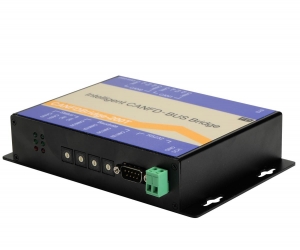
CAN FD Repeater
The CAN-FD-BRIDGE-200T Series CAN FD Repeater utilizes automatic bidirectional switching requiring no control signal. The product can be used as CAN to CAN FD converter or CAN FD repeater.
As CAN (FD) intelligent bridge, CAN-FD-BRIDGE-200T CAN to CAN FD adaptor supports the default conversion processing of CAN to CAN FD, CAN to CAN FD, CAN to CAN, CAN FD to CAN FD, etc. In addition, it also provides special conversion processing such as merging (several can messages forming a CAN FD message), splitting (a CAN FD message is split into several can messages), and frame mapping. Users can freely set the rules of CAN (FD) message forwarding mapping, packet Grouping and unpacking to meet their own application requirements.
Feature & Benefits:
32-bit 400m high-speed processor, embedded with real-time operating system and adaptive flow control algorithm, is suitable for the system with strict real-time requirements.
The port has queue buffering to ensure the frame integrity of all applications from low speed to high speed.
The port uses rotary dial switch to set the baud rate of CAN FD data domain and arbitration domain. For most applications, customers do not need to use configuration software.
The port has sending, receiving and status indication separately, which is convenient for industrial field debugging.The configuration software and configuration method of CAN (FD) to serial port, CAN (FD) bridge, CAN (FD) switch, CAN (FD) to optical (point-to-point), CAN (FD) to optical (bus type), CAN (FD) and optical hybrid switch are completely unified. Customers can switch between these products seamlessly.
The Series CAN FD bridge can be widely used, such as Industrial Controls, Intelligent Transportation Systems (ITS), Industrial Networking,
Supervisory Control and Data (SCADA) and so on.

Other Specs:
- Linking two CAN nets with data buffering
- Different bit rates on the CAN nets possible
- 11-bit ID and 29-bit ID bridge
- Internal microcontroller MB90F543
- High-Speed CAN interface acc. to ISO 11898-2, 5 Mbit/s
- Electrical isolation by optocouplers and DC/DC-converters
- Configuration of the CAN-FD-Bridge module is easily done by means of a PC/terminal
- Isolation 3000Vsm
- Lightning/Surge Protection 1~2 lightning strikes
- ESD Protection 15KV
CAN FD:
- Connector Type Terminal
- Data Rate: 5Kbps~5Mbps
- Extended Distance 10Km
- Operating Temperature -40 ~ 70C / -40 ~ +158F
- Operating Humidity 0 ~ 95% non-condensing
- Mean Time Between Failure (MTBF) > 70, 000hrs
- Power Supply Input Voltage 9~40V DC
- Power Supply Output Voltage 5V DC
- Dimensions (W × D× W) 156mm× 108mm× 33.6mm
|
Model Number |
Description |
Fiber No. |
Fiber Mode |
Fiber Connector |
|
HFD-FO-FD-P1M |
Point to Point Link,Single Fiber(BI-DI), 2km, DIN Rail mount |
1 |
Multi Mode |
ST/SC/FC |
|
HFD-FO-FD-P2M |
Point to Point Link,Dual Fiber, 2km, DIN Rail mount |
2 |
Multi Mode |
ST/SC/FC |
|
HFD-FO-FD-P1S |
Point to Point Link,Single Fiber(BI-DI), 20km, DIN Rail mount |
1 |
Single Mode |
ST/SC/FC |
|
HFD-FO-FD-P2S |
Point to Point Link,Dual Fiber, 20km, DIN Rail mount |
2 |
Single Mode |
ST/SC/FC |
|
CAN-FD-FIB-100PT-P1M |
Point to Point Link,Single Fiber(BI-DI), 2km, Wall or rack mount |
1 |
Multi Mode |
ST/SC/FC |
|
CAN-FD-FIB-100PT-P2M |
Point to Point Link,Dual Fiber, 2km, Wall or rack mount |
2 |
Multi Mode |
ST/SC/FC |
|
CAN-FD-FIB-100PT-P1S |
Point to Point Link,Single Fiber(BI-DI), 20km, Wall or rack mount |
1 |
Single Mode |
ST/SC/FC |
|
CAN-FD-FIB-100PT-P2S |
Point to Point Link,Dual Fiber, 20km, Wall or rack mount |
2 |
Single Mode |
ST/SC/FC |
|
CAN-FD-100BT-M2M |
Multi-drop Link,Dual Fiber(BI-DI), 2km |
2 |
Multi Mode |
ST/SC/FC |
|
CAN-FD-100BT-M4M |
Multi-drop Link,4 Fiber, 2km |
4 |
Multi Mode |
ST/SC/FC |
|
CAN-FD-100BT-M2S |
Multi-drop Link,Dual Fiber(BI-DI), 20km |
2 |
Single Mode |
ST/SC/FC |
|
CAN-FD-100BT-M4S |
Multi-drop Link,4 Fiber, 20km |
4 |
Single Mode |
ST/SC/FC |
|
CAN-FD-FIB-MIXED-P1M |
CANFD Fiber Optic Switch, 2 CAN+2 Fiber |
2 |
Multi Mode |
ST/SC/FC |
|
CANFD-FIB-MIXED-P2M |
CANFD Fiber Optic Switch, 2 CAN+4 Fiber |
4 |
Multi Mode |
ST/SC/FC |
|
CANFD-FIB-MIXED-P1S |
CANFD Fiber Optic Switch, 2 CAN+2 Fiber |
2 |
Single Mode |
ST/SC/FC |
|
CANFD-FIB-MIXED-P2S |
CANFD Fiber Optic Switch, 2 CAN+4 Fiber |
4 |
Single Mode |
ST/SC/FC |
|
CANFD-Bridge-200T |
CAN FD to CAN Bus Bridge |
N/A |
N/A |
N/A |
|
CANFD-SW-400T |
CAN FD Switch |
N/A |
N/A |
N/A |
|
CANFD-COM-100T |
CAN FD to RS-232/485/422 Converter |
N/A |
N/A |
N/A |
|
CANFD-USB-100T |
CAN FD to USB Converter, 1 channel |
N/A |
N/A |
N/A |
|
CANFD-USB-200T |
CAN FD to USB Converter, 2 channels |
N/A |
N/A |
N/A |
|
CANFD-NET-100T |
CAN FD to Ethernet Converter 1 channel |
N/A |
N/A |
N/A |
|
CANFD-NET-200T |
CAN FD to Ethernet Converter 2 channels |
N/A |
N/A |
N/A |
Difference between CAN and CAN-FD
According to the standard frame structure defined by can specification iso11898-2, a frame message can only transmit 64 bits (8 bytes) of data at most. In the best case, the bus load can reach about 70%, but if the message data is less than 8 bytes, the bus load may be smaller. We may ask why we can't raise the baud rate of can standard? In fact, there is a very important factor. Can uses arbitration mechanism to determine the priority of can message transmission of different nodes. During the arbitration period, all nodes on the same bus must arrive in a bit time. On the other hand, electrical signals have a limited propagation speed. From a lot of experience, the longest distance of CAN bus running at 1mbit / S is 40m. The higher the baud rate, the shorter the communication distance.
Main differences between CAN FD and CAN:
There are two main differences between CAN-FD and CAN
1. Variable rate
CAN-FD adopts two bit rates: the variable rate is from the BRS bit in the control field to the front of the ACK field (including CRC separator), and the rest is the rate used by the original can bus. Each of the two rates has a set of bit time definition registers. In addition to using different bit time units TQ, the bit time allocation ratio of each segment can also be different.
2. New data field length
CAN-FD greatly expands the length of the data field. The DLC supports 64 bytes at most. When the DLC is less than or equal to 8, it is the same as the original can bus. When the DLC is greater than 8, there is a nonlinear growth, so the maximum data field length can reach 64 bytes.
Introduction of CAN FD
1. CAN-FD data frame format
EDL bit, BRS bit and ESI bit are added to the control field of CAN-FD data frame. A new DLC encoding method and a new CRC algorithm are adopted (CRC field is extended to 21 bits). CAN-FD data frame format is shown in Figure 3.
2. Introduction of new added bit
EDL bit: (extended data length) the reserved bit r in the original CAN data frame. The function of this bit is:
Recessive: indicates CAN-FD message (using new DLC coding and CRC algorithm)
Explicit: indicates can message
BRS bit: (bit rate switch) the function of this bit is:
Recessive: it means conversion variable rate
Dominant: indicates no conversion rate
ESI (error state indicator), the function of this bit is:
Recessive: indicates that the sending node is in an error passive state
Explicit: indicates that the sending node is in the active error state
EDL bit can indicate can message or can-fd message; BRS represents bit rate conversion. When the bit is recessive, the conversion rate is used to transmit from BRS bit to CRC identifier, and other bit fields use standard bit rate. When the bit is dominant, it is transmitted at normal can-fd bus rate. By adding ESI bit, the status of current sending node can be easily known.
3. New CRC algorithm
Because of the interference of bit filling rule to CRC, the error frame miss detection rate of CAN bus is not up to the design intention. CAN-FD has changed the CRC algorithm, that is, CRC is calculated by bit stream with filling bits. In the check sum part, in order to avoid more than six consecutive bits, it is determined to add a padding bit to the first bit and every four bits after it to be segmented. The value of this padding bit is the inverse code of the previous bit. As a format check, if the padding bit is not the inverse code of the previous bit, an error will be dealt with. The CRC field of can-fd is extended to 21 bits. Because the length of data field has a large range of variation, different CRC should be applied according to the size of DLC to generate polynomial CRC_ 17, suitable for frames with frame length less than 210 bits, CRC_ 21, suitable for frames with frame length less than 1023 bits.
4. New DLC coding
A new DLC coding method is adopted in CAN-FD data frame. Linear rule is adopted when the data field length is 0-8 bytes, and nonlinear coding is used when the data field length is 12-64 bytes. As shown in Figure 5.

CAN to CAN FD Converter
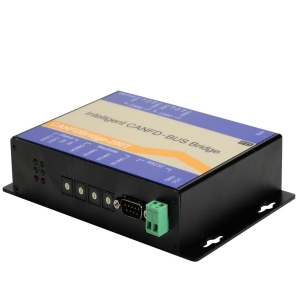
CAN to CAN FD Converter
The CAN-FD-BRIDGE-200T Series CAN to CAN FD conveter utilizes automatic bidirectional switching requiring no control signal. The product can be used as CAN to CAN FD converter or CAN FD repeater.
As CAN (FD) intelligent bridge, CAN-FD-BRIDGE-200T CAN to CAN FD converter supports the default conversion processing of CAN to CAN FD, CAN to CAN FD, CAN to CAN, CAN FD to CAN FD, etc. In addition, it also provides special conversion processing such as merging (several can messages forming a CAN FD message), splitting (a CAN FD message is split into several can messages), and frame mapping. Users can freely set the rules of CAN (FD) message forwarding mapping, packet Grouping and unpacking to meet their own application requirements.
Feature & Benefits:
32-bit 400m high-speed processor, embedded with real-time operating system and adaptive flow control algorithm, is suitable for the system with strict real-time requirements.
The port has queue buffering to ensure the frame integrity of all applications from low speed to high speed.
The port uses rotary dial switch to set the baud rate of CAN FD data domain and arbitration domain. For most applications, customers do not need to use configuration software.
The port has sending, receiving and status indication separately, which is convenient for industrial field debugging.The configuration software and configuration method of CAN (FD) to serial port, CAN (FD) bridge, CAN (FD) switch, CAN (FD) to optical (point-to-point), CAN (FD) to optical (bus type), CAN (FD) and optical hybrid switch are completely unified. Customers can switch between these products seamlessly.
The Series CAN FD bridge can be widely used, such as Industrial Controls, Intelligent Transportation Systems (ITS), Industrial Networking,
Supervisory Control and Data (SCADA) and so on.
Other Specs:
- Linking two CAN nets with data buffering
- Different bit rates on the CAN nets possible
- 11-bit ID and 29-bit ID bridge
- Internal microcontroller MB90F543
- High-Speed CAN interface acc. to ISO 11898-2, 5 Mbit/s
- Electrical isolation by optocouplers and DC/DC-converters
- Configuration of the CAN-FD-Bridge module is easily done by means of a PC/terminal
- Isolation 3000Vsm
- Lightning/Surge Protection 1~2 lightning strikes
- ESD Protection 15KV
CAN FD:
- Connector Type Terminal
- Data Rate: 5Kbps~5Mbps
- Extended Distance 10Km
- Operating Temperature -40 ~ 70C / -40 ~ +158F
- Operating Humidity 0 ~ 95% non-condensing
- Mean Time Between Failure (MTBF) > 70, 000hrs
- Power Supply Input Voltage 9~40V DC
- Power Supply Output Voltage 5V DC
- Dimensions (W × D× W) 156mm× 108mm× 33.6mm
|
Model Number |
Description |
Fiber No. |
Fiber Mode |
Fiber Connector |
|
HFD-FO-FD-P1M |
Point to Point Link,Single Fiber(BI-DI), 2km, DIN Rail mount |
1 |
Multi Mode |
ST/SC/FC |
|
HFD-FO-FD-P2M |
Point to Point Link,Dual Fiber, 2km, DIN Rail mount |
2 |
Multi Mode |
ST/SC/FC |
|
HFD-FO-FD-P1S |
Point to Point Link,Single Fiber(BI-DI), 20km, DIN Rail mount |
1 |
Single Mode |
ST/SC/FC |
|
HFD-FO-FD-P2S |
Point to Point Link,Dual Fiber, 20km, DIN Rail mount |
2 |
Single Mode |
ST/SC/FC |
|
CAN-FD-FIB-100PT-P1M |
Point to Point Link,Single Fiber(BI-DI), 2km, Wall or rack mount |
1 |
Multi Mode |
ST/SC/FC |
|
CAN-FD-FIB-100PT-P2M |
Point to Point Link,Dual Fiber, 2km, Wall or rack mount |
2 |
Multi Mode |
ST/SC/FC |
|
CAN-FD-FIB-100PT-P1S |
Point to Point Link,Single Fiber(BI-DI), 20km, Wall or rack mount |
1 |
Single Mode |
ST/SC/FC |
|
CAN-FD-FIB-100PT-P2S |
Point to Point Link,Dual Fiber, 20km, Wall or rack mount |
2 |
Single Mode |
ST/SC/FC |
|
CAN-FD-100BT-M2M |
Multi-drop Link,Dual Fiber(BI-DI), 2km |
2 |
Multi Mode |
ST/SC/FC |
|
CAN-FD-100BT-M4M |
Multi-drop Link,4 Fiber, 2km |
4 |
Multi Mode |
ST/SC/FC |
|
CAN-FD-100BT-M2S |
Multi-drop Link,Dual Fiber(BI-DI), 20km |
2 |
Single Mode |
ST/SC/FC |
|
CAN-FD-100BT-M4S |
Multi-drop Link,4 Fiber, 20km |
4 |
Single Mode |
ST/SC/FC |
|
CAN-FD-FIB-MIXED-P1M |
CANFD Fiber Optic Switch, 2 CAN+2 Fiber |
2 |
Multi Mode |
ST/SC/FC |
|
CANFD-FIB-MIXED-P2M |
CANFD Fiber Optic Switch, 2 CAN+4 Fiber |
4 |
Multi Mode |
ST/SC/FC |
|
CANFD-FIB-MIXED-P1S |
CANFD Fiber Optic Switch, 2 CAN+2 Fiber |
2 |
Single Mode |
ST/SC/FC |
|
CANFD-FIB-MIXED-P2S |
CANFD Fiber Optic Switch, 2 CAN+4 Fiber |
4 |
Single Mode |
ST/SC/FC |
|
CANFD-Bridge-200T |
CAN FD to CAN Bus Bridge |
N/A |
N/A |
N/A |
|
CANFD-SW-400T |
CAN FD Switch |
N/A |
N/A |
N/A |
|
CANFD-COM-100T |
CAN FD to RS-232/485/422 Converter |
N/A |
N/A |
N/A |
|
CANFD-USB-100T |
CAN FD to USB Converter, 1 channel |
N/A |
N/A |
N/A |
|
CANFD-USB-200T |
CAN FD to USB Converter, 2 channels |
N/A |
N/A |
N/A |
|
CANFD-NET-100T |
CAN FD to Ethernet Converter 1 channel |
N/A |
N/A |
N/A |
|
CANFD-NET-200T |
CAN FD to Ethernet Converter 2 channels |
N/A |
N/A |
N/A |
CAN to CAN FD Adaptor
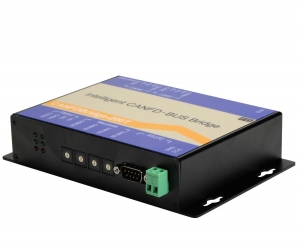
CAN to CAN FD Adaptor
The CAN-FD-BRIDGE-200T Series CAN FD bridge adaptor utilizes automatic bidirectional switching requiring no control signal. The product can be used as CAN to CAN FD converter or CAN FD repeater.
As CAN (FD) intelligent bridge, CAN-FD-BRIDGE-200T CAN to CAN FD adaptor supports the default conversion processing of CAN to CAN FD, CAN to CAN FD, CAN to CAN, CAN FD to CAN FD, etc. In addition, it also provides special conversion processing such as merging (several can messages forming a CAN FD message), splitting (a CAN FD message is split into several can messages), and frame mapping. Users can freely set the rules of CAN (FD) message forwarding mapping, packet Grouping and unpacking to meet their own application requirements.
Feature & Benefits:
32-bit 400m high-speed processor, embedded with real-time operating system and adaptive flow control algorithm, is suitable for the system with strict real-time requirements.
The port has queue buffering to ensure the frame integrity of all applications from low speed to high speed.
The port uses rotary dial switch to set the baud rate of CAN FD data domain and arbitration domain. For most applications, customers do not need to use configuration software.
The port has sending, receiving and status indication separately, which is convenient for industrial field debugging.The configuration software and configuration method of CAN (FD) to serial port, CAN (FD) bridge, CAN (FD) switch, CAN (FD) to optical (point-to-point), CAN (FD) to optical (bus type), CAN (FD) and optical hybrid switch are completely unified. Customers can switch between these products seamlessly.
The Series CAN FD bridge can be widely used, such as Industrial Controls, Intelligent Transportation Systems (ITS), Industrial Networking,
Supervisory Control and Data (SCADA) and so on.
Other Specs:
- Linking two CAN nets with data buffering
- Different bit rates on the CAN nets possible
- 11-bit ID and 29-bit ID bridge
- Internal microcontroller MB90F543
- High-Speed CAN interface acc. to ISO 11898-2, 5 Mbit/s
- Electrical isolation by optocouplers and DC/DC-converters
- Configuration of the CAN-FD-Bridge module is easily done by means of a PC/terminal
- Isolation 3000Vsm
- Lightning/Surge Protection 1~2 lightning strikes
- ESD Protection 15KV
CAN FD:
- Connector Type Terminal
- Data Rate: 5Kbps~5Mbps
- Extended Distance 10Km
- Operating Temperature -40 ~ 70C / -40 ~ +158F
- Operating Humidity 0 ~ 95% non-condensing
- Mean Time Between Failure (MTBF) > 70, 000hrs
- Power Supply Input Voltage 9~40V DC
- Power Supply Output Voltage 5V DC
- Dimensions (W × D× W) 156mm× 108mm× 33.6mm
|
Model Number |
Description |
Fiber No. |
Fiber Mode |
Fiber Connector |
|
HFD-FO-FD-P1M |
Point to Point Link,Single Fiber(BI-DI), 2km, DIN Rail mount |
1 |
Multi Mode |
ST/SC/FC |
|
HFD-FO-FD-P2M |
Point to Point Link,Dual Fiber, 2km, DIN Rail mount |
2 |
Multi Mode |
ST/SC/FC |
|
HFD-FO-FD-P1S |
Point to Point Link,Single Fiber(BI-DI), 20km, DIN Rail mount |
1 |
Single Mode |
ST/SC/FC |
|
HFD-FO-FD-P2S |
Point to Point Link,Dual Fiber, 20km, DIN Rail mount |
2 |
Single Mode |
ST/SC/FC |
|
CAN-FD-FIB-100PT-P1M |
Point to Point Link,Single Fiber(BI-DI), 2km, Wall or rack mount |
1 |
Multi Mode |
ST/SC/FC |
|
CAN-FD-FIB-100PT-P2M |
Point to Point Link,Dual Fiber, 2km, Wall or rack mount |
2 |
Multi Mode |
ST/SC/FC |
|
CAN-FD-FIB-100PT-P1S |
Point to Point Link,Single Fiber(BI-DI), 20km, Wall or rack mount |
1 |
Single Mode |
ST/SC/FC |
|
CAN-FD-FIB-100PT-P2S |
Point to Point Link,Dual Fiber, 20km, Wall or rack mount |
2 |
Single Mode |
ST/SC/FC |
|
CAN-FD-100BT-M2M |
Multi-drop Link,Dual Fiber(BI-DI), 2km |
2 |
Multi Mode |
ST/SC/FC |
|
CAN-FD-100BT-M4M |
Multi-drop Link,4 Fiber, 2km |
4 |
Multi Mode |
ST/SC/FC |
|
CAN-FD-100BT-M2S |
Multi-drop Link,Dual Fiber(BI-DI), 20km |
2 |
Single Mode |
ST/SC/FC |
|
CAN-FD-100BT-M4S |
Multi-drop Link,4 Fiber, 20km |
4 |
Single Mode |
ST/SC/FC |
|
CAN-FD-FIB-MIXED-P1M |
CANFD Fiber Optic Switch, 2 CAN+2 Fiber |
2 |
Multi Mode |
ST/SC/FC |
|
CANFD-FIB-MIXED-P2M |
CANFD Fiber Optic Switch, 2 CAN+4 Fiber |
4 |
Multi Mode |
ST/SC/FC |
|
CANFD-FIB-MIXED-P1S |
CANFD Fiber Optic Switch, 2 CAN+2 Fiber |
2 |
Single Mode |
ST/SC/FC |
|
CANFD-FIB-MIXED-P2S |
CANFD Fiber Optic Switch, 2 CAN+4 Fiber |
4 |
Single Mode |
ST/SC/FC |
|
CANFD-Bridge-200T |
CAN FD to CAN Bus Bridge |
N/A |
N/A |
N/A |
|
CANFD-SW-400T |
CAN FD Switch |
N/A |
N/A |
N/A |
|
CANFD-COM-100T |
CAN FD to RS-232/485/422 Converter |
N/A |
N/A |
N/A |
|
CANFD-USB-100T |
CAN FD to USB Converter, 1 channel |
N/A |
N/A |
N/A |
|
CANFD-USB-200T |
CAN FD to USB Converter, 2 channels |
N/A |
N/A |
N/A |
|
CANFD-NET-100T |
CAN FD to Ethernet Converter 1 channel |
N/A |
N/A |
N/A |
|
CANFD-NET-200T |
CAN FD to Ethernet Converter 2 channels |
N/A |
N/A |
N/A |